I Over-Engineered an LED Strip and Gave It a REST API, Web UI, HomeKit, and MCP
I attached an ESP32 to 90 NeoPixels and gave it far more than it needed - 23 effects with variations, a REST API, a web UI, Apple Home (HomeKit), automations, and an MCP server so AI agents can control the lights too.

TL;DR
I over-engineered 90 NeoPixels with an ESP32-C6: 23 effects with 5 variations each, REST API, web UI, HomeKit, mDNS, persistent state, and MCP. Control it with Apple Shortcuts, NFC, browsers, Apple Home, or even AI agents.
I've always been obsessed with lighting - I've written about it on my blog, including Merry Pixels: A Hand-Crafted Programmable Christmas Star and The Story of a Light Bulb - and NeoPixels are truly a great technology for anyone who loves lighting.
See the project here: Pixels String
It started with a very simple mood light idea
The hardware is simple. I used an M5Stack NanoC6 (ESP32-C6) connected to about 90 NeoPixels.
At first, the idea was to create a firefly-like effect using these 90 LEDs to make a nice ambient light. It looks superb at night, but when you're doing something on your laptop or reading, it's not that useful. So I added more animations, which can be changed by pressing the button on the controller. Eventually, it turned into 23 effects - fireflies, rainbow swipes, comets, heartbeats, lightning storms, and more - each with 5 variations you can cycle through.
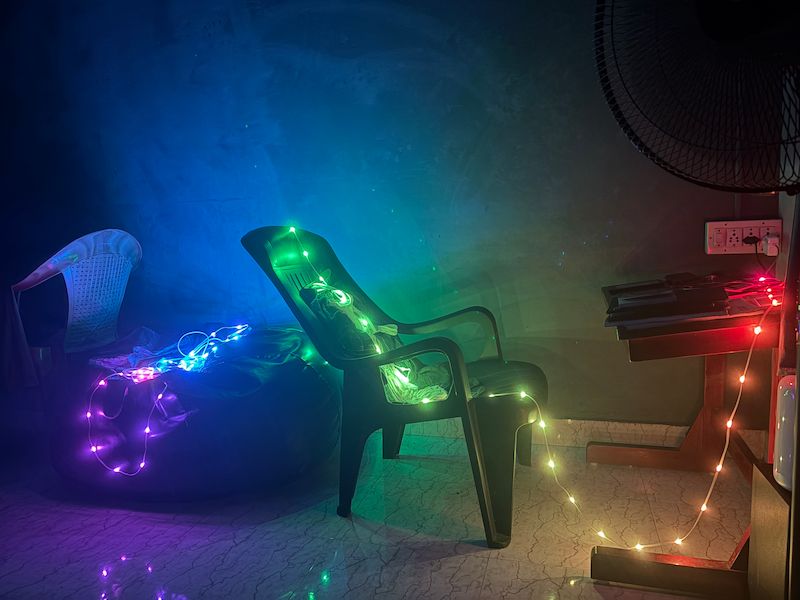
There’s a Twinkling Stars mode, a Fireflies mode, a slow Heartbeat, and a Pixel Runner that moves across the strip.
Everything runs directly on the ESP32. No external rendering, no streaming. I just need to press the button on the controller, and the light effect changes. A single click cycles to the next effect, a double click steps through that effect's variations, and a long press turns the strip on or off.
Then I gave it an API
To change the animation, I had to manually press the button each time. Walking to the controller every time I changed the effect became irritating. So, to make it more accessible, I first exposed a few capabilities through REST APIs. I added the following:
- GET /api/effect?name=
- Sets an animation. (eg: AURORA | FIREFLY | HEARTBEAT etc) - GET /api/variation?index=<0-4> - Set the variation of the current effect.
- GET /api/power?state=<on|off> - Turn LEDs on or off.
- GET /api/brightness?value=<0-255> - Set the global LED brightness. Applied to every effect and pattern, and saved to NVS (non-volatile storage) so it persists across reboots. 0 turns the LEDs off, 255 is maximum. Read the current value from /api/info.
- GET /api/pixels/set - Set pixel colors with customizable patterns. All parameters are passed as query strings.
- GET /api/info - Returns a JSON object with the current state.
- GET /config - Set the NeoPixel color order (RGB, GRB, BGR, etc.) and LED count dynamically. Both apply immediately and persist across reboots.
- GET /help - Plain-text listing of all available endpoints.
It can switch animations, change brightness, set colors, and control how much of the strip is active. At that point, anything that can make an HTTP request can control the light. And that completely changed how I used it.
Web UI for mobile and desktop
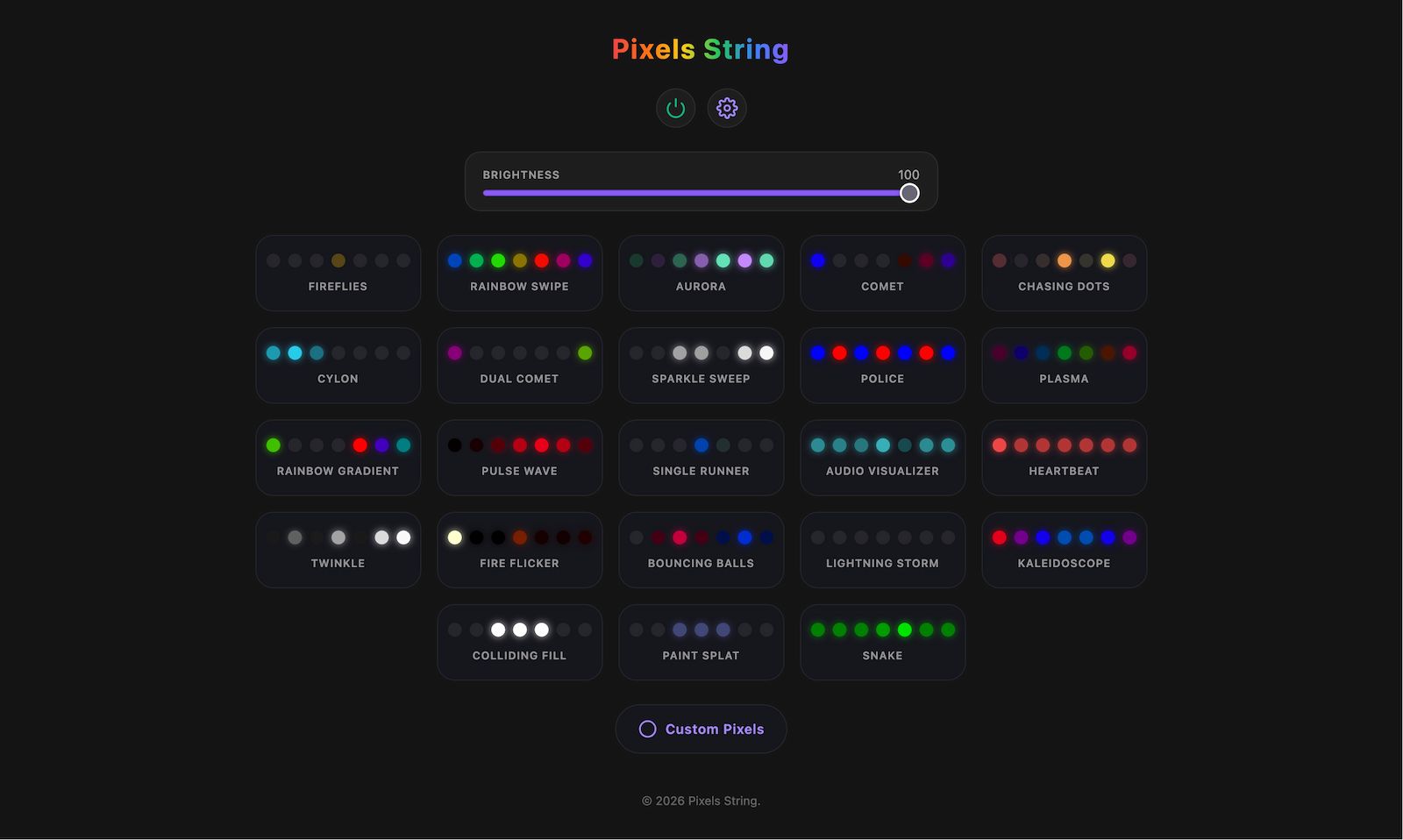
I also added a simple web UI. No backend, no cloud, no extra server. The ESP32 serves everything (HTML, CSS and JS) directly from flash memory. This web page internally calls the REST APIs I created before to control the light.
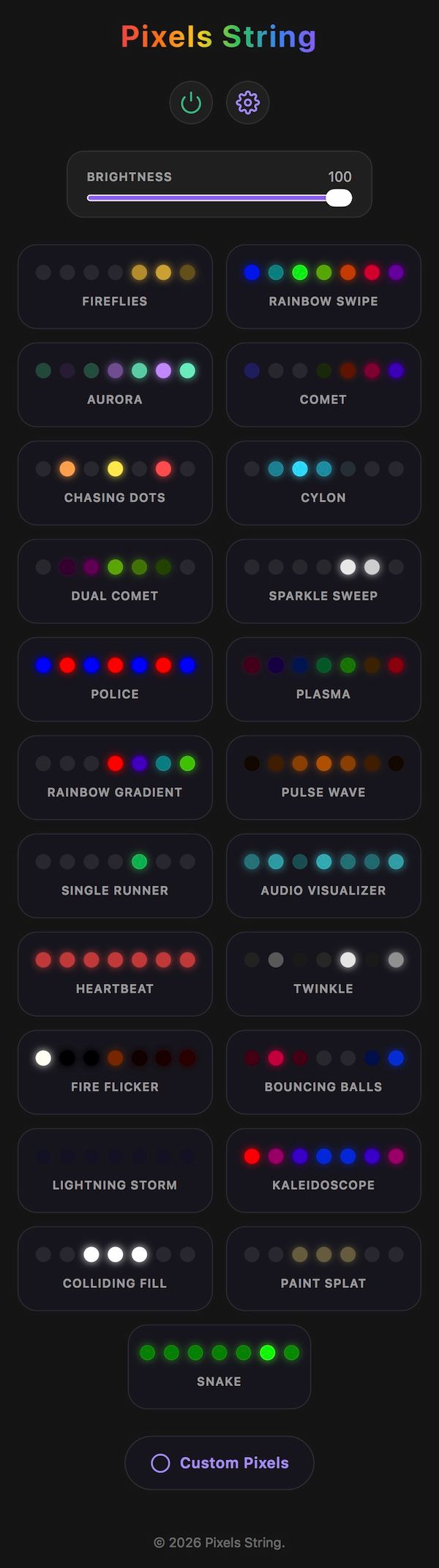
It supports mDNS too, so I don't even need to remember the IP address - it's also given a static IP for reliability. Settings like Wi-Fi, brightness, animation state, and even the LED count are saved to NVS, so it survives reboots, and it watches the WiFi link and reconnects automatically if it ever drops. It became a fully self-contained, internet-connected (LAN) light.
A few useful automations
Once something has an HTTP interface, it becomes easy to automate.
Apple Shortcuts can call the API directly, so I can link lighting to whatever I’m doing. Open Spotify and the room turns green. Open a movie/video app and the lights dim. Switch apps and the colors shift.
The apps don't need to know the light exists. Shortcuts is just the glue between them.
Arrive Home → Change the Room Mood Light
When my phone connects to Wi-Fi, an automation runs and the light turns on with my usual evening color.
No hub, no ecosystem. Just an event triggering an HTTP request.
NFC Tag by the Bed
I also stuck an NFC tag near my bed. A tap on it switches the room to a warm, low-brightness mode. Another NFC tag I placed near my table triggers a bright yellow light, good for reading and for when I'm using a computer.
It’s basically a physical shortcut button for lighting.
Then it joined Apple Home
Since the ESP32 is already sitting on the network, I figured it might as well join Apple Home too. Using the HomeSpan library, the strip shows up in the Home app as a Lightbulb accessory - on/off, a brightness slider, and a color wheel. Pairing is just scanning a QR code in the Home app.
HomeKit has no native "effect" menu, so the 23 animations each appear as their own Switch - tap the "AURORA" switch and the aurora runs and powers the strip on; tap another and it switches over. Using the Lightbulb itself (on/off, brightness, or color) drops the strip back into solid-color mode. It's the closest HomeKit gets to a proper effects menu.
It became one more control surface I didn't know I wanted. I walk in, tell Siri "turn on the mood light," and the room fills with my usual evening color - no Shortcuts automation needed.
Then I gave it a pinch of AI support
I added an MCP server in the Arduino program so AI agents can control the light. Now I can just say "set the room to purple" and it actually happens.
Browser Controlled
I also made a Firefox extension that reads the theme color of the current tab and sends it to the light. So the room subtly follows what I'm browsing. Switch tabs, and the lighting changes.
Pinterest -> Red LinkedIn -> Blue Spotify -> Green
No special integration needed - just a plugin that extracts the color from metadata or the favicon, then invokes the same REST API.
The point of all this
Did it need REST APIs? No. Did it need MCP? Definitely not. But that's the point.
The LEDs are the visual part, but the API is the real project. The hardware is simple. The system is simple. Yet once your room mood light becomes programmable, it stops being just a smart light. Anything can control it - phone, browser, scripts, NFC tags, AI agents - and none of them need to know the device exists. They just speak HTTP.
That's what made it interesting. It started as ESP32 → LEDs, and slowly became anything → API → the room.
Not because it had to, but because it was fun to see how far it could go.
Once your room's lighting has an API, ideas come easily. You could turn it red on failed builds, show weather through color, indicate focus or availability, react to music, show notifications, or reflect calendar status.
Or you can just run a calm animation and ignore all of that.