
May 11, 2026
Score Board
Score. Save. Repeat. The elegant way to track your game scores

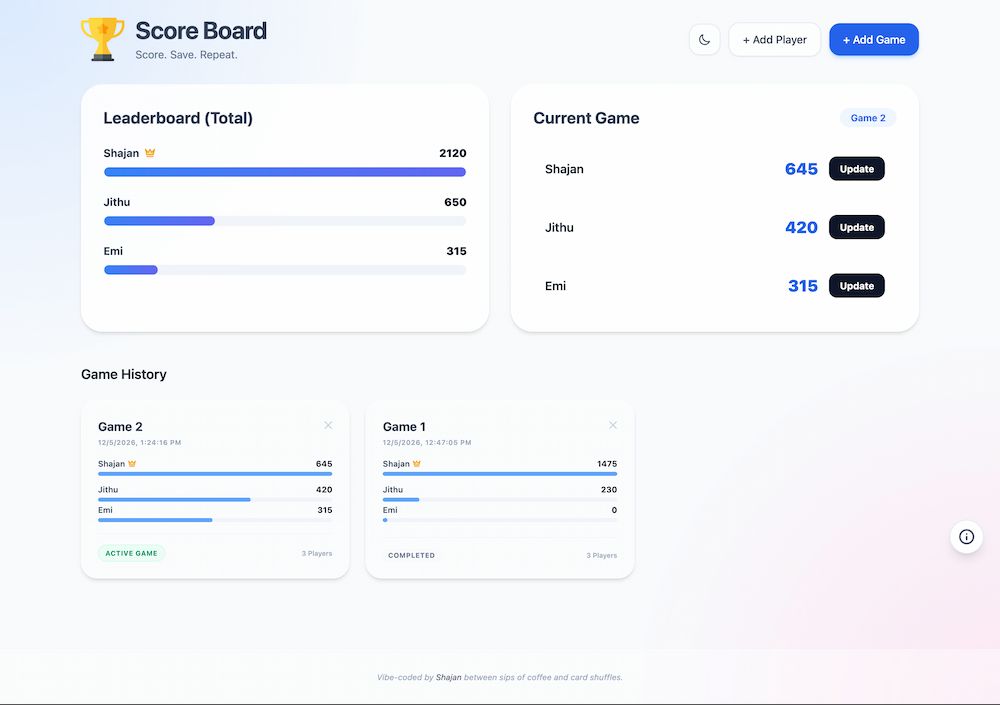
Score Board is a simple, elegant, and mobile-friendly web application designed to track scores for card games, board games, or any friendly competition. With a focus on speed and aesthetic, it features a modern glassmorphism UI, real-time leaderboard updates, and persistent game history.
🚀 Features
- Glassmorphism UI: A modern, clean, and interactive design.
- Dark Mode Support: Automatically respects system preferences or can be toggled manually.
- Real-time Leaderboard: Visualizes total scores across all games with dynamic progress bars.
- Active Game Tracking: Easily update scores for the current game.
- Game History: Keep track of previous games, players, and final scores.
- Player Management: Add and remove players easily.
- Local Persistence: All data is stored locally in your browser using LocalStorage—no backend required.
- Responsive Design: Works great on desktops, tablets, and smartphones.
🛠️ Built With
- HTML5: Semantic structure.
- Tailwind CSS: Modern utility-first styling.
- Vanilla JavaScript: Lightweight and fast logic without external dependencies.
- LocalStorage: Persistent client-side data storage.
📖 How to Use
- Add Players: Click the "+ Add Player" button to register the names of your friends.
- Start a Game: Click "+ Add Game", give it a name, and select the players participating.
- Update Scores: In the "Current Game" section, click "Update" next to a player's name to add points or replace their current score.
- View History: Scroll down to see the "Game History" cards for all previous sessions.
- Toggle Theme: Use the theme toggle in the header to switch between Light and Dark modes.